A recipe photo shows the finished dish, but it rarely shows the story behind it — the sizzle when something hits the pan, the slow simmer that fills a kitchen with smell, the moment a sauce finally comes together. With image to video technology, that missing story can finally be told.
A single recipe photo can become a short cooking scene that captures the process, not just the plate. Dreamina, powered by its latest and most advanced video generation model, Seedance 2.5, turns static recipe photography into cooking stories that pull viewers in from prep to plate.
A finished dish is only the last page of the story
Every great recipe has a narrative arc — chopping, searing, simmering, plating — but most recipe photography only ever shows the ending. That’s a missed opportunity, because the process itself is often what makes viewers want to actually cook something, rather than just admire it. A cooking story restores that missing arc, giving a single photo the beginning, middle, and end a finished plate alone can’t tell.
Why process matters as much as the final plate
Viewers connect with cooking content differently depending on what they’re shown. A few things a cooking story adds that a plated photo can’t:
- A sense of technique, like stirring, searing, or reducing a sauce
- Sensory cues, such as steam, sizzle, or bubbling that suggest smell and sound
- An emotional build, where anticipation grows as the dish comes together
Turning your recipe photo into a cooking story with Dreamina
Step 1: Upload your recipe photo and describe the process
Sign in to Dreamina and open the “AI Video” section. Click “Add reference image” to upload your recipe photo, then write a prompt describing the cooking motion you want to bring to life.
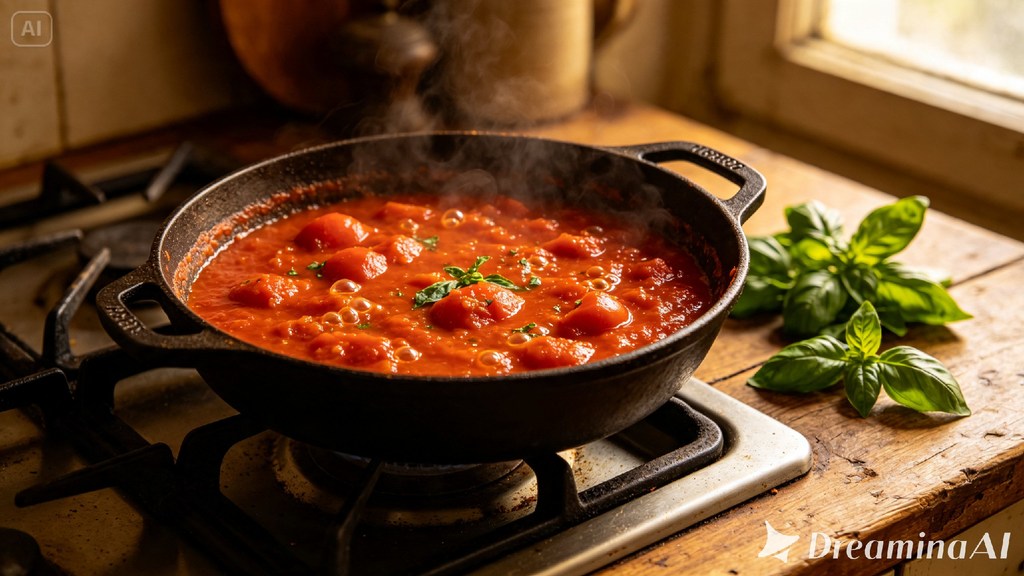
For a 30-second clip, try: Using the simmering sauce and basil from the reference image, generate a 30-second cooking video: the sauce gently bubbling and reducing in the pot, steam rising softly, fresh basil leaves being torn and dropped in, camera slowly zooming in on the sauce thickening in the final seconds.
Step 2: Generate the story with Seedance 2.5
Select the Seedance 2.5 model, choose your video length, then pick an aspect ratio suited to your platform — 9:16 for TikTok or Instagram Reels, 16:9 for YouTube cooking content. Click Dreamina’s generate icon and let the process come to life.
Step 3: Enhance and export your cooking story
Refine the finished clip using Dreamina’s editing tools — Upscale for sharper detail on texture and steam, generate a soundtrack for warm background music or subtle kitchen ambiance — then export and share it with your audience.
Inside Seedance 2.5: bringing cooking to life convincingly
Realistic texture over the “AI look”
Cooking content depends heavily on believable texture — steam, the bubbling liquid, melting cheese — and Seedance 2.5 has significantly reduced the artificial “AI look” in favor of more physically realistic motion and lighting, which matters enormously when the goal is making food look genuinely appetizing in motion.
Longer clips for a fuller cooking arc
Native clips now support up to 30 seconds, with the “Ultra-long Video Generation (beta)” mode extending that range up to 180 seconds — enough time to move from a simmering start to a finished, plated result in one continuous sequence.
Precise local editing
Local editing allows specific elements — a stray utensil, an unwanted ingredient in frame — to be removed or adjusted without regenerating the entire scene, keeping small fixes small.
Cleaner base footage
The model resolves issues with random subtitles or irrelevant background music appearing unprompted, leaving clean footage that’s simple to layer your own recipe captions or soundtrack onto afterward.
Multilingual support for global food audiences
With strong coverage across languages including Spanish, Indonesian, Thai, Arabic, and Japanese, cooking creators can pair their stories with captions or narration suited to audiences well beyond their home market.
Choosing which part of the recipe to animate
Not every stage of a recipe needs equal screen time. The most compelling moments to animate are usually the ones with the clearest visual drama — a sauce reducing, a sear forming, a garnish being added — rather than quieter prep steps like measuring or chopping, which often read fine as text or a single photo.
Matching pacing to the type of dish
A slow-simmered sauce calls for gentle, unhurried motion that lets anticipation build gradually, while a quick sear or stir-fry benefits from faster, punchier movement that matches the energy of the technique itself. Naming that pacing directly in your prompt helps Seedance 2.5 shape the story to match how the dish is actually cooked.
Building a full recipe story from multiple clips
A single animated moment captures one part of the process, but stringing several together — the chop, the sear, the simmer, the plate — can turn a handful of favorite recipe photos into a short cooking story that plays almost like a mini episode, without filming a single second of original footage.
Where these cooking stories perform best
Animated recipe content works especially well on food blogs, social recipe pages, restaurant marketing, and cooking course platforms, where showing the process in motion often draws far more engagement than a photo of the finished dish alone.
Final thought
A recipe was never just about the plate at the end — it was always about everything that happened to get there. With Dreamina and the sensory realism behind Seedance 2.5, a single photo can finally tell that fuller story, turning a static dish into a scene worth watching from the very first sizzle.